5 Types of Sensitive Data Leaking Through AI Tools

An engineer at a mid-size healthtech company pasted an entire patient database schema into ChatGPT to debug a query. Nobody knew for three weeks.
That is not a hypothetical. We see variations of this every time we analyze AI usage patterns inside healthcare organizations.
The adoption of AI assistants like ChatGPT, Gemini, Copilot, and Claude inside healthcare companies is accelerating. Clinicians use them for documentation. Engineers use them for code. Operations teams use them for everything from scheduling to compliance reporting. The productivity gains are real.
But so is the data exposure.
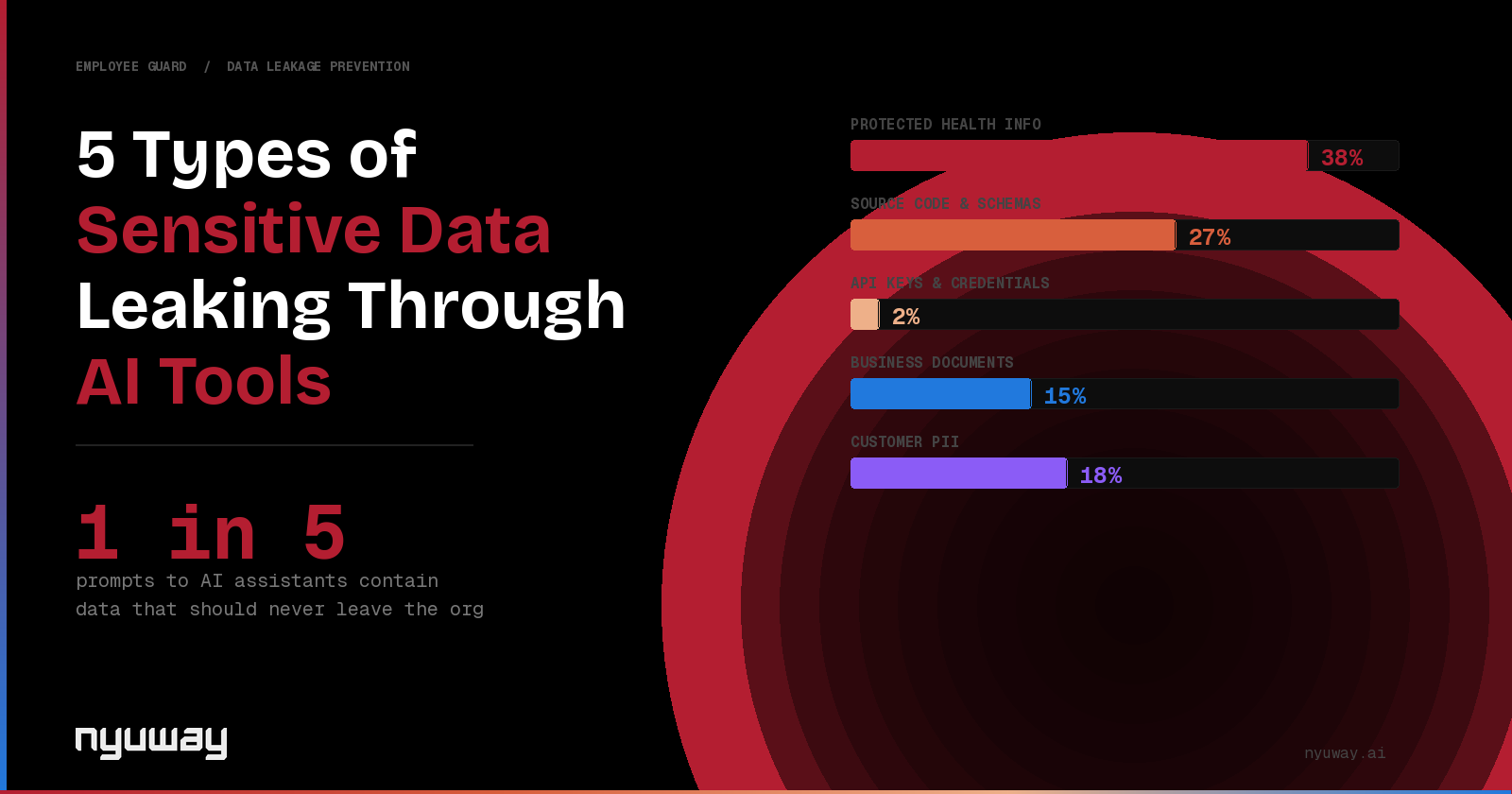
We analyzed AI prompt patterns across mid-market healthcare organizations and found that roughly 1 in 5 prompts contain data that should never leave the organization. Here are the five categories that show up most frequently.
1. Protected Health Information (PHI)
This is the most obvious and the most dangerous. PHI includes patient names, medical record numbers, dates of birth, diagnoses, treatment plans, and insurance identifiers.
How it leaks: clinicians copy patient notes into AI tools to summarize them. Care coordinators paste discharge summaries to draft follow-up communications. Even administrative staff paste insurance claims data to ask the AI for help processing them.
The problem is not that people are being careless. The problem is that AI assistants have made it so easy to process unstructured text that employees default to pasting whatever they are working on without thinking about what is in it.
Every one of these prompts is a potential HIPAA violation. And unlike a misdirected email, there is no recall button on a prompt sent to a third-party AI service.
2. Source Code and Database Schemas
Development teams are the heaviest users of AI assistants. They paste code into ChatGPT and Copilot dozens of times per day to debug, refactor, and generate tests.
In healthcare organizations, that code often contains hardcoded connection strings, API endpoints for patient-facing systems, database schemas that reveal the structure of PHI storage, and internal service names that map out the company's architecture.
One database schema pasted into an AI assistant can tell a sophisticated attacker exactly how patient data is stored, which fields are indexed, and what relationships exist between tables. It is an architecture diagram delivered for free.
3. API Keys and Credentials
This one is less frequent but has the highest severity when it happens. Engineers paste environment files, configuration blocks, and error logs that contain API keys, database passwords, service tokens, and cloud credentials.
In healthcare environments, these credentials often provide access to systems that store or process PHI. A single exposed AWS key or database connection string can be the difference between a contained incident and a reportable breach.
Most employees do not even realize they have pasted a credential. It is buried in a log file or a configuration block that they are asking the AI to help them understand.
4. Internal Business Documents and Protocols
Healthcare organizations run on internal protocols. Clinical workflows, formulary decisions, pricing strategies, vendor contracts, board materials, and HR policies.
When employees paste these into AI assistants to summarize, rewrite, or analyze them, the content leaves the organization's control. This includes merger discussions, competitive analyses, vendor negotiation strategies, and internal communications that were never intended for external audiences.
The risk here is not just data exposure. It is competitive exposure. Internal pricing models, partnership terms, and strategic plans in the hands of an AI training dataset are a different kind of risk than PHI, but still one that most organizations have not accounted for.
5. Patient Communications and Clinical Notes
This is a growing category. Clinicians and care teams use AI assistants to draft patient communications, rewrite clinical notes for clarity, translate medical terminology for patient-facing materials, and generate summaries for referral letters.
Each of these use cases involves pasting the original clinical content into the AI. That content almost always contains patient-identifying information, diagnosis details, medication lists, and treatment histories.
The intent is good. The clinician wants to communicate more clearly with the patient. But the mechanism involves sending protected data to a third-party service with no audit trail, no policy enforcement, and no guarantee about how that data is stored or used.
What Security Teams Should Do
The answer is not to ban AI tools. That approach pushes usage to personal devices and removes all visibility.
The answer is to govern AI usage with the same rigor you apply to any other data channel. That means three things.
First, get visibility. You cannot protect what you cannot see. Know which AI tools your employees are using, how often, and what types of data are flowing through them.
Second, enforce policy at the point of interaction. When an employee is about to paste PHI into a ChatGPT prompt, the response should happen in real time: block it, redact the sensitive elements, or allow it with logging depending on your risk tolerance and the use case.
Third, build an audit trail. When your compliance officer or auditor asks what controls you have over AI data flows, you should be able to show them a log of every interaction, every policy decision, and every detection event.
This is exactly what we built at Nyuway. Employee Guard sits between your team and AI assistants, detecting sensitive data in real time, enforcing your policies, and creating the audit trail your compliance team needs.
If this problem is on your radar, reach out on LinkedIn or visit nyuway.ai.